instant result after drop/transparent PNG export/no uploads to any server/browser-based, pure pixel math
AI images
AI gave you the image. RemoveWhite gives you transparency.
AI image tools often export artwork on white or black backgrounds, or hand you a so-called
transparent PNG that turns out to have a grey checkerboard baked right into the image itself.
That includes images made with Midjourney, DALL-E, ChatGPT, Claude, Stable Diffusion,
Ideogram, Leonardo AI, Nano Banana and many other generators.
The problem only becomes obvious when you place the image on a website, product mockup or social post.
RemoveWhite removes those white or black pixels directly in your browser.
No upload. No AI guessing. No re-prompting. Drop your image, remove the background
and download a clean transparent PNG or WebP — ready for websites, products, print and social media.
Got a fake transparent PNG?
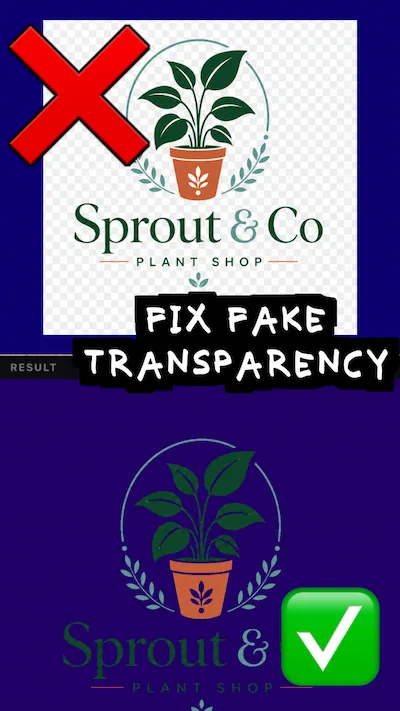
Some AI generators export a PNG with a grey checkerboard pattern that looks like transparency
but isn't. Those grey-white blocks are baked into the pixels. Standard background removers
don't catch them because there's no hard edge to detect.
RemoveWhite removes pixels by color value, not by edge detection. If the checkerboard
only covers the background area, move the Threshold slider higher and those pixels disappear.
If the checkerboard is baked across the entire image including your graphic itself,
no pixel tool can fix that — you'd need to regenerate the image.
▶
before
after: actually transparentSame logo, different backgrounds.
How it works
01
Drop your AI image
Use any PNG, JPG or WebP exported from your AI image tool — with a white, black or fake checkerboard background.
02
Remove the background pixels
White or black background pixels disappear instantly. Move Threshold higher if off-white pixels or checkerboard blocks remain. Use Feather and Edge Shrink to clean up edges.
03
Download your transparent file
Export a transparent PNG or WebP, ready for design tools, websites, social media, merchandise or print.
Works with
MidjourneyDALL-EChatGPTClaudeStable DiffusionIdeogramLeonardo AINano BananaAny tool that exports on white or black
Your designs stay yours
Nothing uploaded — everYour images never leave your device. All processing runs in your browser.
No AI, no guessingPure pixel math. The tool removes exactly the pixels you tell it to — no surprises, no edge detection, no background AI.
No account, no passwordDrop your image, download your PNG. Access links come by email — no login needed.
Secure checkout via Stripe · Prices shown in your local currency · All major cards accepted
Common questions
Does it work with Midjourney images?
Yes. Drop your export and RemoveWhite removes the white background in your browser. No upload, no account required.
Can I use it for DALL-E or ChatGPT-generated images?
Yes. If your DALL-E or ChatGPT-generated image comes with a white, black or fake-transparent background, RemoveWhite can turn those pixels transparent and export a clean PNG.
What about Stable Diffusion, Ideogram or Leonardo AI?
Works with all of them. If your AI tool exports on white or black, RemoveWhite can make those pixels transparent.
Does it also work with black backgrounds?
Yes. Switch the tool to Remove Black mode and it removes black or near-black pixels the same way. Useful for AI-generated images on dark or black backgrounds.
My AI image has a fake checkerboard background — can you fix that?
Sometimes. If the checkerboard only covers the background area, move the Threshold slider higher and those pixels disappear. If the checkerboard is baked across the entire image including your graphic itself, no pixel tool can fix that — you'd need to regenerate the image in your AI tool.
Why not just ask the AI tool to generate with transparency?
Some AI tools now offer transparency or background editing, but the result isn't always clean. You may still get white pixels, black pixels, off-white edges or a fake checkerboard pattern. RemoveWhite gives you direct control over those pixels in the browser.
Does it work with off-white backgrounds?
Yes. Use the Threshold slider to remove more or less white. This helps with images that have a slightly off-white or warm-white background.
Can I export with a colored background instead of transparent?
Yes. In the Edit panel, use Export background → Color to pick any color. That color will be baked into your downloaded file. Useful for mockups or social posts where you want a specific background color.
Will my image be uploaded to a server?
No. Your image stays in your browser. RemoveWhite processes the pixels locally on your device. Nothing is sent to removewhite.com's servers.
Is there a subscription?
No. You can use a day pass (€3.99, 24 hours) or a year pass (€39.99, 365 days). No auto-renewal.